Apple has transformed desktop computing with its powerful Apple Silicon processors, offering incredible speed, energy efficiency, and reliability. Whether you’re setting up a home office, running a creative studio, or upgrading your business workspace, Apple desktops provide excellent performance for a wide range of users.
However, choosing between the iMac, Mac Mini, and Mac Studio can be confusing. Each model is designed for different users, budgets, and workloads.
This guide explains the key differences, benefits, and factors to consider before purchasing an Apple desktop, helping you make an informed decision.
Understanding Apple’s Desktop Lineup
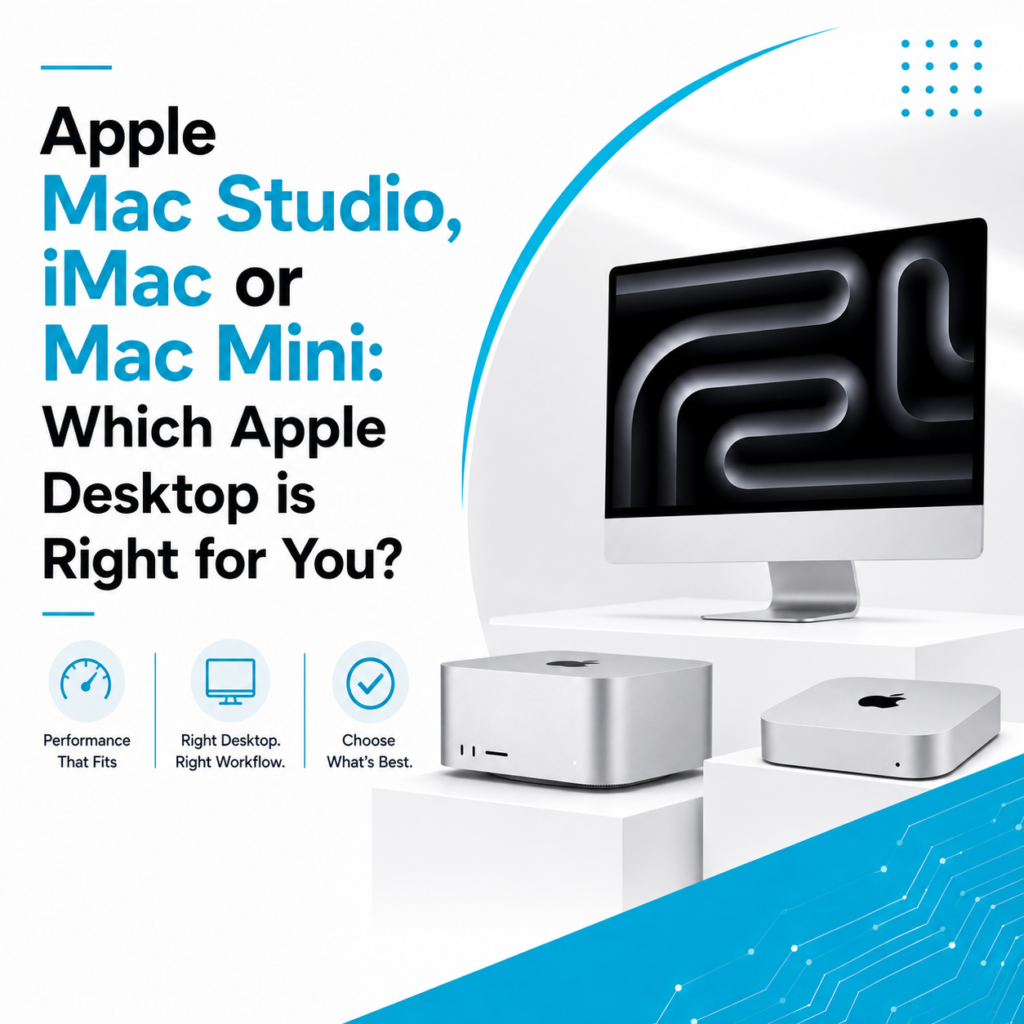
Apple currently offers three primary desktop solutions:
- iMac
- Mac Mini
- Mac Studio
Although all three run macOS and use Apple Silicon processors, they are designed for different performance levels and user requirements.
Apple iMac – The Perfect All-in-One Desktop
The Apple iMac combines a high-performance computer with a stunning Retina display in a sleek, space-saving design.
Best For
- Home users
- Students
- Teachers
- Office professionals
- Small businesses
- Reception desks
- Creative professionals with moderate workloads
Key Benefits
- Beautiful all-in-one design
- High-resolution Retina display
- Minimal cable clutter
- Quiet operation
- Excellent webcam and speakers
- Energy-efficient performance
Because everything is built into the display, the iMac is ideal for users who want a clean and modern workspace.
Apple Mac Mini – Small Size, Big Performance
The Mac Mini is Apple’s most compact desktop computer.
Although it doesn’t include a monitor, keyboard, or mouse, it offers impressive performance in a very small form factor.
Best For
- Office work
- Software developers
- Students
- Business users
- Small offices
- Home workstations
Key Benefits
- Affordable entry into the Apple ecosystem
- Compact design
- Flexible monitor choices
- Low power consumption
- Easy workspace setup
Since you can connect your preferred monitor, the Mac Mini offers flexibility while remaining budget-friendly.
Apple Mac Studio – Built for Professional Work
Mac Studio is Apple’s most powerful desktop solution for professionals handling demanding workloads.
Best For
- Video editors
- Graphic designers
- 3D artists
- Animation professionals
- Music producers
- Software developers
- AI and machine learning professionals
Key Benefits
- Exceptional processing power
- Professional-grade graphics performance
- Multiple high-speed ports
- Excellent cooling system
- Supports multiple displays
- Handles intensive workflows with ease
Mac Studio is designed for users who require maximum performance every day.
iMac vs Mac Mini vs Mac Studio
Feature | iMac | Mac Mini | Mac Studio |
Display Included | ✅ Yes | ❌ No | ❌ No |
Performance | Excellent | Excellent | Professional Grade |
Portability | Moderate | High | Moderate |
Price | Mid-range | Budget Friendly | Premium |
Ideal User | Home & Office | Business & Students | Creative Professionals |
Expandability | Limited | Flexible | Highly Flexible |
Which Apple Desktop is Best for Students?
Students typically need a reliable desktop for:
- Online learning
- Assignments
- Research
- Presentations
- Creative projects
The iMac offers a complete desktop solution, while the Mac Mini is an affordable option if you already own a monitor.
Best Apple Desktop for Businesses
Businesses require systems that are:
- Reliable
- Fast
- Secure
- Energy-efficient
- Easy to maintain
For most offices, the Mac Mini provides excellent value.
Reception areas and executive cabins often benefit from the elegant design of the iMac, while design agencies and production houses may require the power of the Mac Studio.
Best Apple Desktop for Creative Professionals
Creative professionals use demanding applications such as:
- Final Cut Pro
- Adobe Premiere Pro
- Photoshop
- Illustrator
- Logic Pro
- Blender
- DaVinci Resolve
For these workloads:
- iMac works well for moderate creative tasks.
- Mac Studio delivers outstanding performance for advanced editing, rendering, and production.
Things to Consider Before Buying an Apple Desktop
1. Understand Your Workload
Choose a desktop based on how you’ll use it.
- Basic office tasks
- Business operations
- Professional editing
- Software development
- Creative production
Buying according to your workload ensures better long-term value.
2. Select the Right Memory (RAM)
Memory affects multitasking and application performance.
Consider higher memory if you regularly work with:
- Large files
- Video editing
- Multiple applications
- Professional software
Remember that Apple desktops have limited upgrade options after purchase.
3. Choose Enough Storage
Available storage options include:
- 256GB
- 512GB
- 1TB
- 2TB and above
Professionals working with large media files should consider larger SSD capacities.
4. Monitor Requirements
Unlike the iMac, the Mac Mini and Mac Studio require an external monitor.
Think about:
- Screen size
- Resolution
- Color accuracy
- Number of displays
This is especially important for designers, editors, and creative professionals.
5. Budget Planning
Before buying, determine:
- Current requirements
- Future expansion
- Software needs
- Accessories required
Choosing the right model based on your budget prevents unnecessary spending.
Why Businesses Are Choosing Apple Desktops
Apple desktops have become increasingly popular among businesses because they offer:
- Excellent reliability
- Long software support
- Strong security
- Energy efficiency
- Quiet operation
- Premium build quality
- High productivity
Their stability makes them ideal for professional environments where downtime is not an option.
Should You Consider a Refurbished Apple Desktop?
Professionally refurbished Apple desktops provide an excellent alternative for businesses and individuals looking to reduce costs.
Benefits include:
- Lower investment
- Professionally tested hardware
- Reliable performance
- Better value for money
- Environment-friendly choice
When purchased from a trusted supplier, refurbished Apple desktops deliver dependable performance for years.
Find the Right Apple Desktop at Laptop Hub
At Laptop Hub, we help individuals, professionals, and businesses choose the right Apple desktop based on their work requirements and budget.
Whether you’re looking for an iMac, Mac Mini, Mac Studio, or a professionally refurbished Apple desktop, our team can guide you toward the best solution.
With quality-tested devices, expert advice, and reliable after-sales support, Laptop Hub makes it easier to invest in the right Apple desktop for your workspace.
Frequently Asked Questions (FAQs)
1. Which Apple desktop is best for office work?
The Mac Mini is an excellent choice for office users because it delivers strong performance, is compact, and offers great value.
2. Is the iMac better than the Mac Mini?
The iMac includes a built-in Retina display and is ideal for users who want an all-in-one desktop. The Mac Mini is more flexible if you already own a monitor.
3. Who should buy a Mac Studio?
Mac Studio is designed for professionals working in video editing, animation, 3D design, music production, software development, and other demanding creative tasks.
4. Can I use multiple monitors with a Mac Studio?
Yes. Mac Studio supports multiple high-resolution displays, making it ideal for professional workflows.
5. Is buying a refurbished Apple desktop worth it?
Yes. A professionally refurbished iMac, Mac Mini, or Mac Studio can provide excellent performance and significant savings when purchased from a trusted supplier.